

What an Instagram QR code does
An Instagram QR code takes people straight to your profile. They scan, the Instagram app opens on your page, and following you is one tap away. No searching for a handle with underscores and dots in it, and no landing on an account with a similar name.
Cafés, shops, makers, photographers, artists, venues and personal brands print them on packaging, shop windows, stickers, market stalls, flyers, menus and business cards. They also work on screens, such as the end of a video or a slide at a talk. A printed code keeps working long after a post has scrolled out of sight, so every bag, box or flyer you hand out becomes a way back to your page.
How to make an Instagram QR code
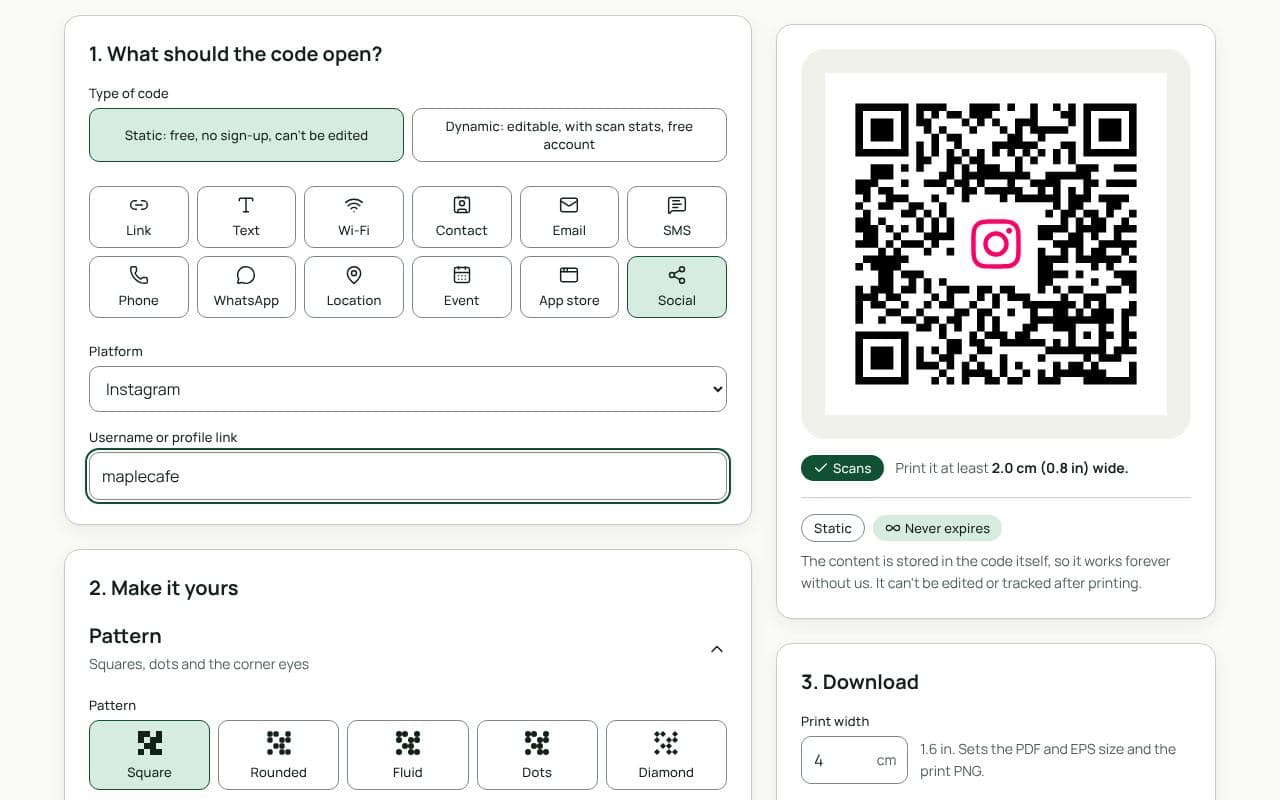
- Check that Social and Instagram are selected. This page loads the Social type with Instagram chosen as the Platform.
- Enter your username or profile link. Type your handle in “Username or profile link”, or paste the address of your profile.
- Choose static or dynamic. Keep Static for a handle you will keep, or choose Dynamic under “Type of code” if you might rebrand or want scan counts.
- Make it yours. Match your feed’s colours, add your logo, and pick a frame with the suggested text “Follow us”.
- Download or save. Download a static code right away, or save a dynamic code to your free account first.
Design and print tips
- Write your handle next to the code. Some people prefer to search. Printing “@yourhandle” under the code also tells everyone what the code opens.
- Use your brand colours carefully. A gradient in the style of your feed looks good, but keep the darkest colours on the modules and a light background behind them. The scan check fails anything under 3:1 contrast.
- Use a small logo or profile mark. Your logo in the centre makes the code recognisable. Keep it modest and watch the scan check.
- Pick the right size. 2.5 cm works on a business card or sticker, 4 to 5 cm on a flyer, and at least 20 cm on a window read from 2 metres away.
- Give people a reason. “Follow us for new drops” or “See this week’s specials” gets more scans than “Follow us on Instagram” alone.
- Use transparent backgrounds with care. A transparent PNG is handy for designs, but only if the surface behind it is light and plain.
Static or dynamic?
Either works
If your handle is settled, a static code works forever with nothing in between. If you might rename the account, move to a new one, or want to know how many people scan your packaging or posters, choose dynamic. It is free and never expires.