

Skip to content
QRfinityQRfinity

Free Calendly QR code generator

Scan to see your free times and book a meeting.

Fill in the details to see your code.

StaticNever expires

1. What should the code open?

Type of code
Content type

The address goes straight into the code. No redirect, no tracking.

2. Make it yours

PatternSquares, dots and the corner eyes
Pattern
Corner frames
Corner centres
ColoursCode, corners and background
Code colour

For PNG, SVG, PDF and EPS. JPG always gets a solid background.

LogoThe Link icon
Logo to show

Shows a link icon for this kind of code. Choose None or your own logo to change it.

FrameA call to action around the code
Frame style
AdvancedError correction and margin

Higher levels survive scratches and smudges but make a denser code.

4 modules
Saved designsReuse a design on your next code

Saved in this browser only. Accounts will keep them across devices.

What a Calendly QR code does

A Calendly QR code opens your booking page in one scan. The person sees your free times, picks one and gets a calendar invite, with no back-and-forth emails. It turns a business card, flyer or conference badge into a booked meeting.

Consultants and coaches put them on cards and slides, salespeople on badges and brochures, tutors and therapists on flyers, and recruiters on job ads.

How to make a Calendly QR code

  1. Copy your booking link. In Calendly, copy the link of the event type you want people to book.
  2. Paste it into Website address. The Calendly logo is added automatically.
  3. Choose static or dynamic. Dynamic lets you swap the meeting type later and counts scans.
  4. Make it yours. Pick colours and a frame like “Book a 15-minute call”.
  5. Test it, then download or save. Scan the code and check the right meeting type opens.
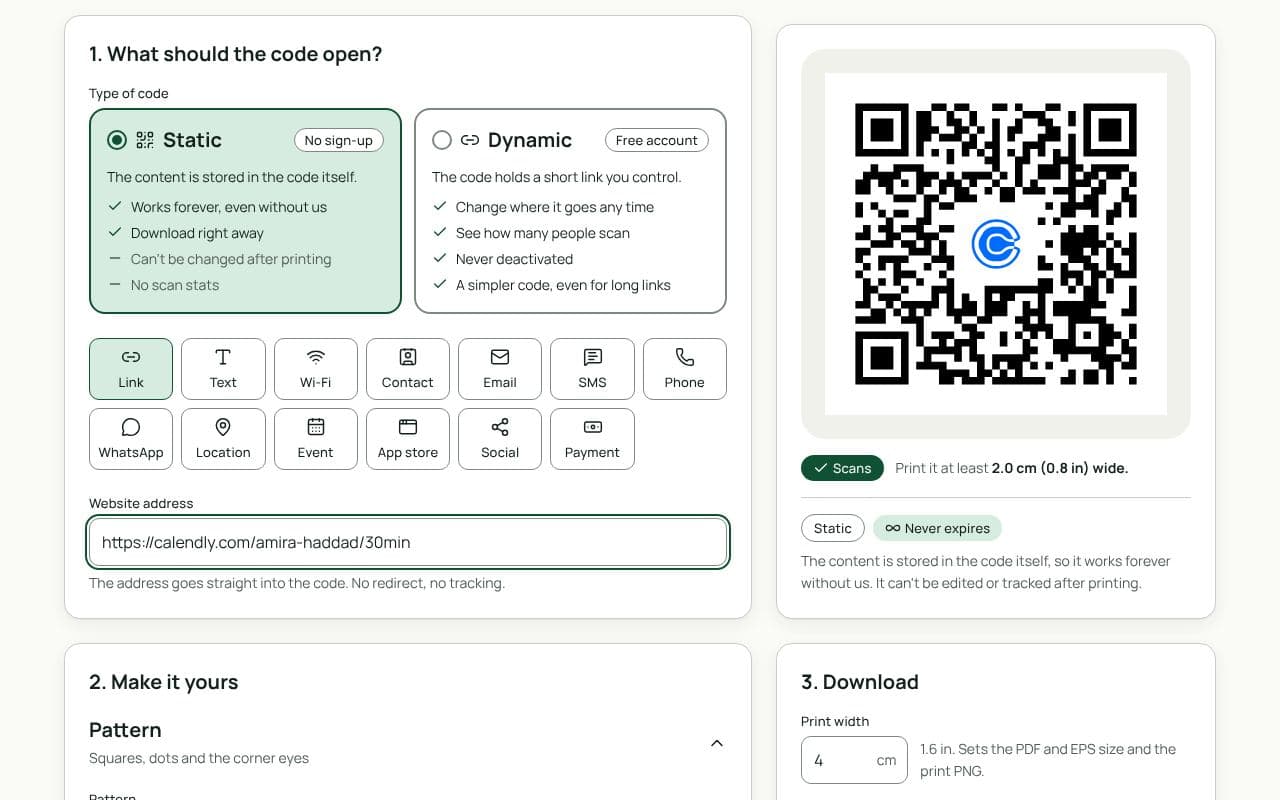
The QRfinity generator with a Calendly booking link in Website address and a code with the Calendly logo in the middle.

Design and print tips

  • Say how long and how much. “Free 15-minute call” tells people exactly what they’re booking.
  • On business cards, 2 to 2.5 cm is enough, with a clear margin.
  • On slides, leave it up during questions, at least a metre wide on the screen.
  • Check your availability first. A code that opens a page with no free times wastes the scan.

Static or dynamic?

Either works

A static code is fine for a booking link you’ll keep. Choose dynamic to change the meeting type or booking tool later without reprinting, and to see how many people scan from each card or slide.

Questions people ask

Does this work with booking tools other than Calendly?

Yes. Any booking page with a link works the same way: Calendly, Cal.com, Google Calendar appointment schedules, Microsoft Bookings, Acuity and others. Paste the link into Website address.

Should the code open my main page or one meeting type?

One meeting type, if the code has one purpose: a “30-minute intro” on a business card, a “consultation” on a flyer. Your main page suits a code that has to cover everything.

What if I change my booking link?

With a dynamic code, update it from your dashboard and every printed code follows. With a static code, keep the old link working in your booking tool, or reprint.

Can I see how many people booked from the code?

A dynamic code shows how many people scanned. Your booking tool shows how many booked, so compare the two to see how many scans turned into meetings.

Guides