

Skip to content
QRfinityQRfinity

Free Google Forms QR code generator

Scan to open your survey, sign-up sheet or quiz.

Fill in the details to see your code.

StaticNever expires

1. What should the code open?

Type of code
Content type

The address goes straight into the code. No redirect, no tracking.

2. Make it yours

PatternSquares, dots and the corner eyes
Pattern
Corner frames
Corner centres
ColoursCode, corners and background
Code colour

For PNG, SVG, PDF and EPS. JPG always gets a solid background.

LogoThe Link icon
Logo to show

Shows a link icon for this kind of code. Choose None or your own logo to change it.

FrameA call to action around the code
Frame style
AdvancedError correction and margin

Higher levels survive scratches and smudges but make a denser code.

4 modules
Saved designsReuse a design on your next code

Saved in this browser only. Accounts will keep them across devices.

What a Google Forms QR code does

A Google Forms QR code opens your form in one scan, on the phone already in people’s hands. No typing a long link from a poster, no passing round a clipboard. Responses land in your form and its spreadsheet as usual.

Teachers use them for exit tickets and quizzes, events for feedback and sign-ups, clubs for membership forms, and shops for customer surveys on receipts and tables.

How to make a Google Forms QR code

  1. Copy your form’s link. In Google Forms, choose Send, then the link icon, and tick “Shorten URL”.
  2. Paste it into Website address. The link is checked as you type.
  3. Choose static or dynamic. Dynamic lets you swap in a new form later and shows how many people scanned.
  4. Make it yours. Pick colours and a frame like “Tell us what you think”.
  5. Test it, then download or save. Scan the code and send a test response, then delete it from the responses tab.
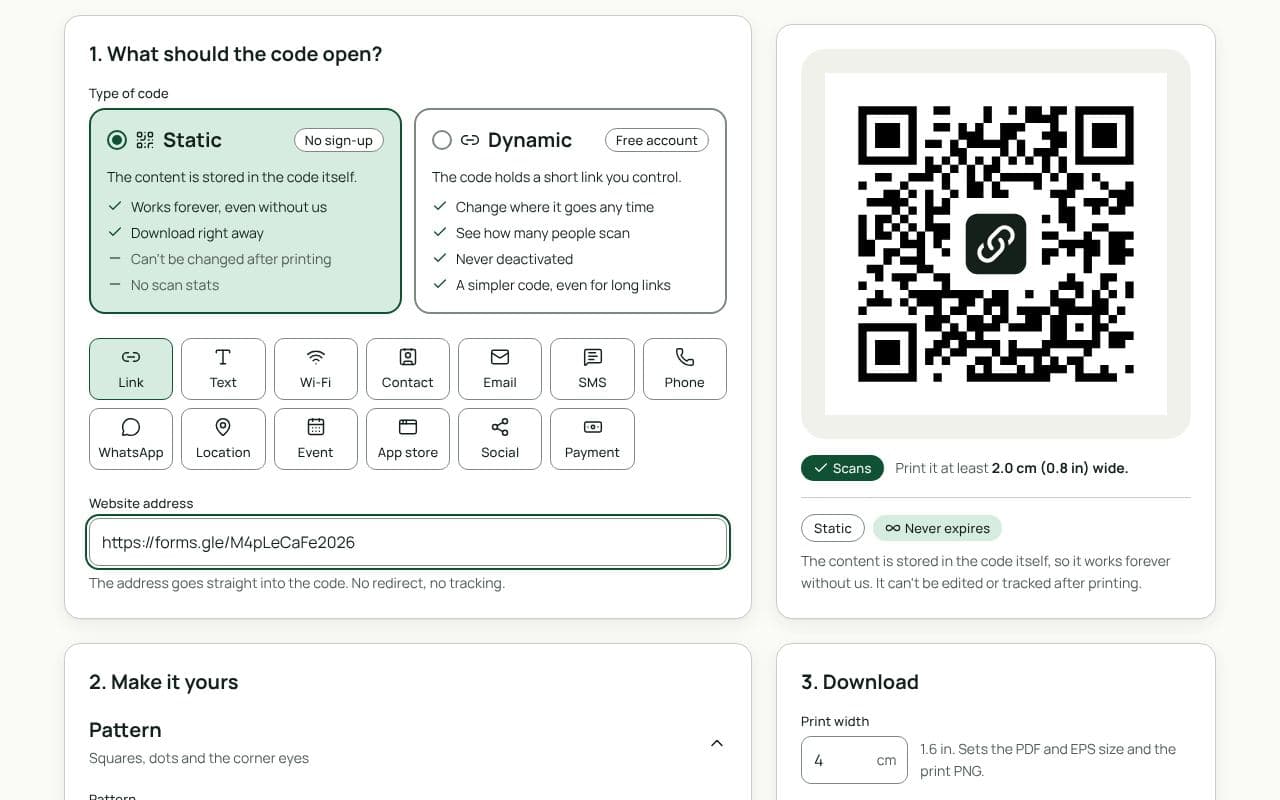
The QRfinity generator with a forms.gle link in Website address and the code preview passing the scan check.

Design and print tips

  • Say how long it takes. “2-minute survey” gets far more responses than “Survey”.
  • Keep the form short and phone-friendly. Multiple choice beats long text boxes on a small screen.
  • On slides, leave it up. Show the code at least a metre wide on the screen while people answer.
  • Use one code per place. A separate dynamic code on each table, flyer or slide shows which one people actually used.

Static or dynamic?

We recommend: dynamic

Forms change: new terms, new events, a fresh survey each year. A dynamic code lets you point the same printed code at the next form without reprinting, and shows how many people scanned. It’s free and never expires.

Questions people ask

Where do I get my Google Form’s link?

Open the form, choose Send, then the link icon. Tick “Shorten URL” for a forms.gle link, copy it, and paste it into Website address here.

Can I switch to a new form without reprinting?

Yes, with a dynamic code. Point it at next term’s sign-up sheet or this year’s survey from your dashboard, and the printed code follows.

Do people need a Google account to fill in the form?

Only if your form’s settings ask for it, for example to limit people to one response. Otherwise anyone can scan and fill it in. Check the settings before you print.

Can I close the form at a certain time?

Google Forms can stop accepting responses. With a dynamic code you can also add a date limit, so scans go to a “thanks, we’re closed” page after the deadline.

Does the code work for Microsoft Forms, Typeform or Jotform?

Yes. Any form with a web link works the same way: paste the share link into Website address.

Guides