

What a Telegram QR code does
A Telegram QR code opens your Telegram username in one scan: a personal profile, a channel, a group or a bot. People don’t have to type a handle with underscores in it or pick you out of a list of similar names. They scan, Telegram opens on your page, and joining or starting a chat takes one tap.
Channels print them on posters and flyers to grow their audience. Shops and support teams use them for a direct chat. Communities put them on event badges and slides, and bot makers use them to send people straight to a bot.
How to make a Telegram QR code
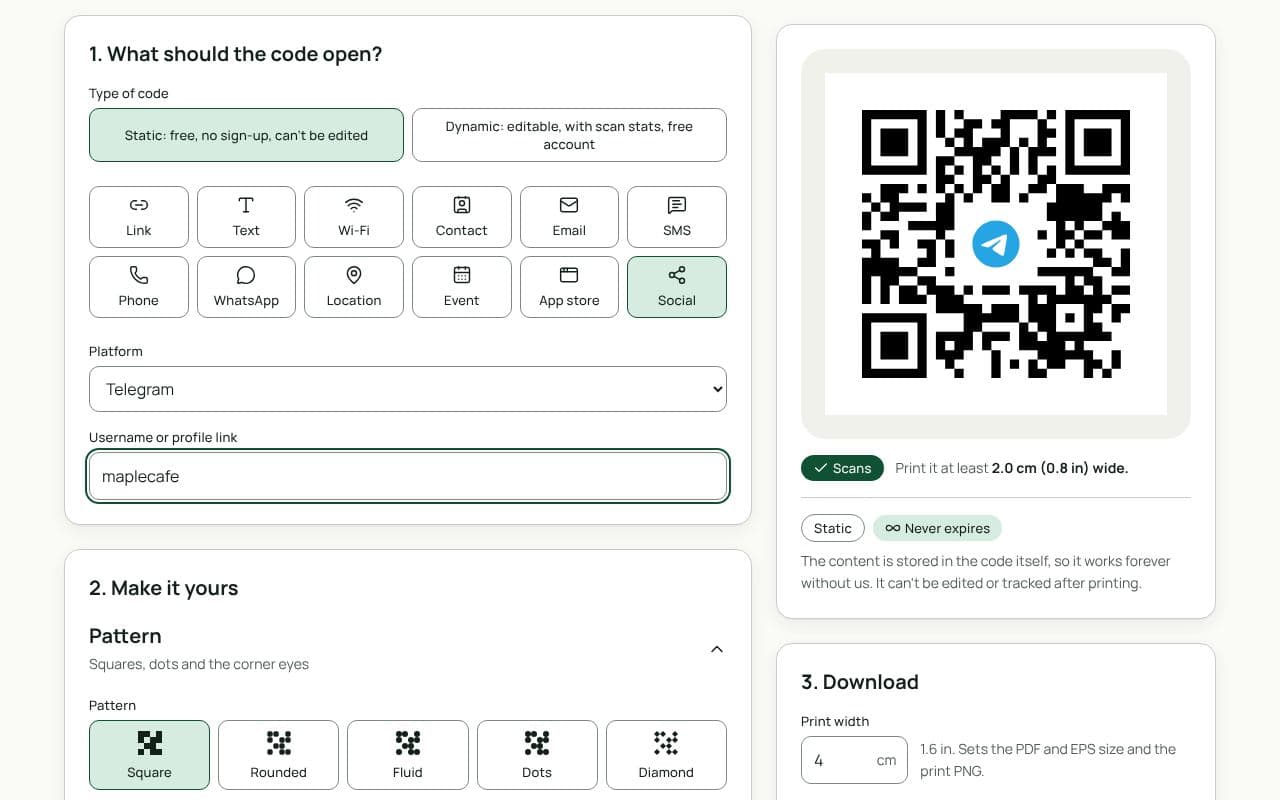
- Check that Social and Telegram are selected. This page loads the Social type with Telegram chosen as the Platform.
- Enter the username. Type it with or without the @, or paste a t.me link. For a private group or channel, paste its invite link.
- Choose static or dynamic. Static keeps working forever with nothing in between. Dynamic lets you change where the code goes later and shows how many people scan it.
- Make it yours. The Telegram logo is already in the middle. Pick colours, and add a frame with words like “Join the channel”.
- Download or save. Download a static code right away, or save a dynamic code to your free account first.
Design and print tips
- Say what people will get. “Daily deals on our channel” earns more scans than “Telegram” alone.
- Print the username too. Write @yourname under the code for anyone who prefers to search.
- Keep the contrast strong. Telegram blue works well for the frame, but keep the modules dark on a light background. The scan check flags anything under 3:1 contrast.
- Size it for the distance. 2.5 cm suits a sticker or card, 4 to 5 cm a flyer, and 20 cm or more a poster read from 2 metres away.
Static or dynamic?
Either works
If the username is settled, a static code works forever with nothing in between. If you might rename the channel, move to a new group, or want scan counts, choose dynamic. It is free and never expires.