

Skip to content
QRfinityQRfinity

QR code for your Amazon store

Your Amazon Store or listing, one scan from anything you print.

DynamicNever expires
Checking

1. What should the code open?

Type of code
Content type

Scans go here. You can change it any time without reprinting.

2. Make it yours

PatternSquares, dots and the corner eyes
Pattern
Corner frames
Corner centres
ColoursCode, corners and background
Code colour

For PNG, SVG, PDF and EPS. JPG always gets a solid background.

LogoThe Link icon
Logo to show

Shows a link icon for this kind of code. Choose None or your own logo to change it.

FrameA call to action around the code
Frame style
AdvancedError correction and margin

Higher levels survive scratches and smudges but make a denser code.

4 modules
Saved designsReuse a design on your next code

Saved in this browser only. Accounts will keep them across devices.

A QR code that opens your Amazon Store or a product page sends people from anything you print, such as flyers, trade show booths, packaging for other channels and catalogues, to the place they can buy in two taps. Make it dynamic so the link can change as your listings do. Free, with no watermark and no expiry.

How to make an Amazon store QR code

  1. Copy the link to your Amazon Store, a product page or your seller profile. If you use Amazon Attribution, copy the tagged link it gives you.
  2. Paste it in “Website address” above and keep the code dynamic.
  3. Add a frame such as “Shop on Amazon”, and your logo if you like.
  4. Download for print. Vector files (SVG, PDF, EPS) for catalogues and booth graphics.
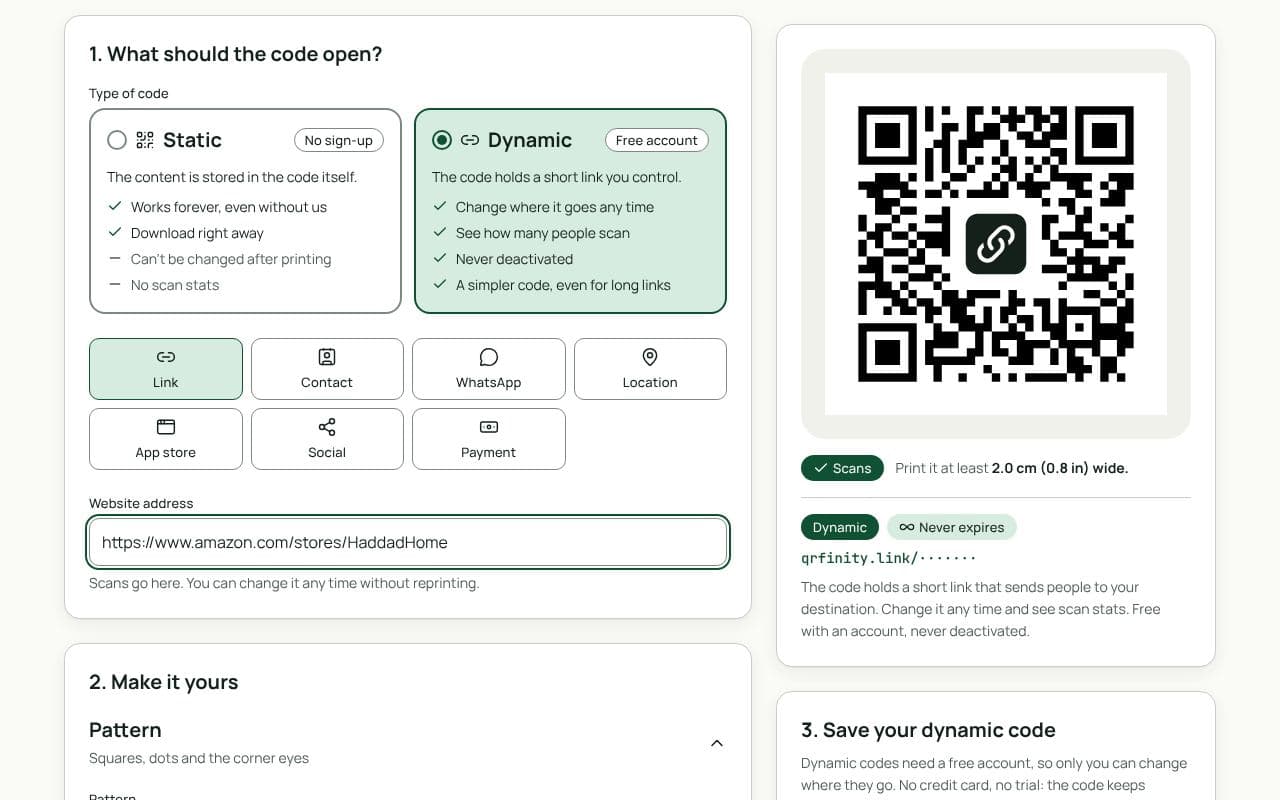
The QRfinity generator with an Amazon Store link in “Website address” and a preview of the scannable code.

Where brands use it

  • Trade shows and pop-ups: a large code on the booth for people who want to buy later.
  • Catalogues, flyers and print ads: straight to the listing, not your home page.
  • Packaging sold in other shops: for refills and accessories.
  • Influencer and partner kits: a code per partner, so scan counts show which one drives interest.

Stay within Amazon’s rules

Inserts in Amazon orders have their own rules: no incentives for reviews, no asking only for positive reviews, and no pulling buyers off Amazon. Our Amazon product insert page covers what you can link to. Policies change, so check Seller Central before you print.

The FNSKU label is a different code

Amazon’s warehouse labels carry an FNSKU barcode, not a QR code. If you send stock to FBA, make those with the FNSKU label generator.

Static or dynamic?

We recommend: dynamic

Choose dynamic. Amazon links change as listings evolve, and you may want to add attribution tags later. The printed code stays the same while you update where it goes, and you see how many people scan it.

Questions people ask

What is an Amazon Store?

A free multi-page storefront on Amazon for brands enrolled in Amazon Brand Registry, with its own address. Sellers without Brand Registry can link to a product page or their seller profile instead.

Can I put a QR code to my Amazon Store on product packaging?

Linking customers to helpful content or to your products is common. What Amazon forbids is using inserts or packaging to offer incentives for reviews or to pull buyers away from Amazon. Check the current seller policies before printing, and see our page on Amazon product inserts.

Will Amazon know the scan came from my packaging?

Amazon Attribution (for brands) gives you tagged links that report off-Amazon traffic and sales. Paste the attribution link into a dynamic code, and you get both Amazon’s sales data and our scan counts.

Static or dynamic?

Dynamic. Amazon links change when listings are merged, products are replaced or you set up attribution tags. A dynamic code lets you update the link without reprinting.

Guides