

Skip to content
QRfinityQRfinity

Wedding QR code generator

From the invitation to the photo album, without typing a single link.

DynamicNever expires
Checking

1. What should the code open?

Type of code
Content type

Scans go here. You can change it any time without reprinting.

2. Make it yours

PatternSquares, dots and the corner eyes
Pattern
Corner frames
Corner centres
ColoursCode, corners and background
Code colour

For PNG, SVG, PDF and EPS. JPG always gets a solid background.

LogoThe Link icon
Logo to show

Shows a link icon for this kind of code. Choose None or your own logo to change it.

FrameA call to action around the code
Frame style
AdvancedError correction and margin

Higher levels survive scratches and smudges but make a denser code.

4 modules
Saved designsReuse a design on your next code

Saved in this browser only. Accounts will keep them across devices.

What wedding QR codes do

QR codes save your guests from typing long links from a card: one scan to RSVP, find the venue, see the schedule or add their photos. On the day, a code on each table can collect every guest’s photos in one shared album.

Which codes a wedding needs

WhenCodeWhat it opens
Save the dateEventAdds the date and place to the guest’s calendar
InvitationDynamic linkYour RSVP form or wedding website
InvitationLocationThe venue in Google Maps
On the dayDynamic linkThe schedule, menu or seating plan
On the dayWi-FiThe venue Wi-Fi, so photos upload
AfterDynamic linkThe shared photo album or a thank-you page

How to make a wedding QR code

  1. Choose what the code opens first. Usually the RSVP form or your wedding website.
  2. Paste the link into Website address. This page starts with a dynamic code, so you can change it later.
  3. Match your stationery. Pick colours from your invitations, a dot pattern, and a frame like “RSVP here”.
  4. Save it and test it. Save the code to your free account, scan a printed test with two phones, then print.
  5. Change it as the day goes. After the RSVP deadline, point it at the schedule; after the wedding, at the photo album.
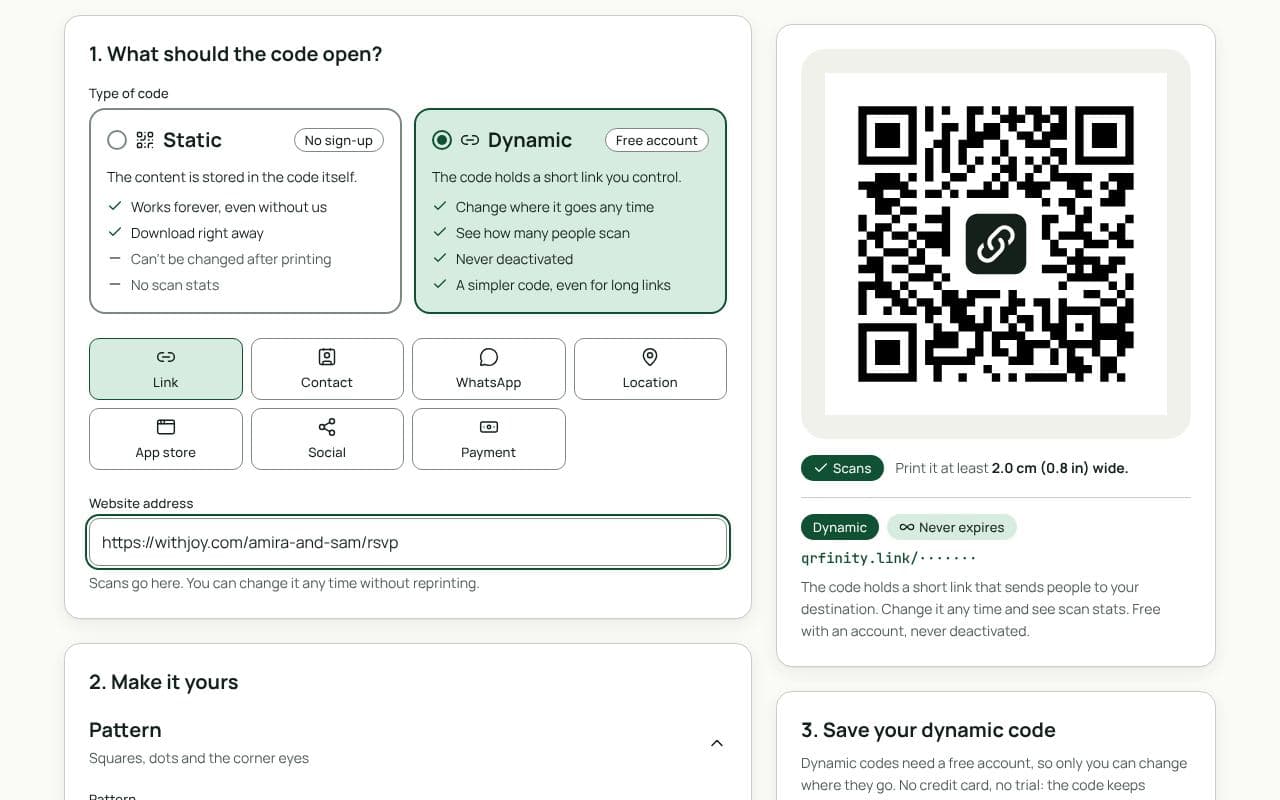
The QRfinity generator set to a dynamic code, with an RSVP link in Website address and the code passing the scan check.

Design and print tips

  • Contrast beats colour. Blush, sage and gold are lovely for the frame; keep the code itself dark enough to stand out from the card.
  • Size for the card. 2.5 cm on invitations and place cards, 5 cm on table cards, 20 cm on a welcome sign.
  • Test on your actual paper. Textured, shimmer and vellum papers can make codes harder to read.
  • Add a short line of text. “Scan to RSVP by 1 June” tells older guests exactly what to do.

Static or dynamic?

We recommend: dynamic

A wedding moves from invitations to the day to the photos, and stationery is printed once. A dynamic code follows along: change it yourself or set a date to switch it. It’s free and never expires.

Questions people ask

What can a wedding QR code open?

Anything with a link: your RSVP form, wedding website, gift registry, the venue in Google Maps, the day’s schedule, or a shared photo album. There are also codes that save the date to a calendar or join the venue Wi-Fi.

Can one code change after the wedding?

Yes, with a dynamic code. Point it at the RSVP form while invitations are out, the schedule on the day, and the photo album afterwards. You can even set a date for it to switch automatically.

Will the code still work years from now?

Yes. Our codes never expire, and dynamic codes keep working whether or not you ever pay us. Just make sure what it points to, such as the photo album, stays shared.

Can I match it to our stationery?

Yes. Pick colours from your invitations, round dots or soft corners, and a frame with your own words. Keep the code clearly darker than the paper so it scans in candlelight.

Can I keep the photos private?

Add a password to the dynamic code and share it with guests on the day, so only they can open the album. The album’s own sharing settings still apply.

Guides